WORKSPACE · OPERATING LAYER

Construction bid management software for teams running multiple pursuits.

Each civil, infrastructure or trade tender opportunity becomes a workspace: documents, criteria, clarifications, AI support, drafts and bid/no-bid decisions in one frame. Run multiple construction pursuits with the evidence library in context, no shared inbox triage. See how civil teams manage tender load in the civil customer story.

Tendor Workspace — one room per tender pursuit with documents, AI support, draft and decisions in one frame

What it is

Not a folder, not a tracker, not a shared inbox. A workspace is the room your team operates a pursuit in — one per opportunity.

  • Multi-pursuit concurrency

    Each opportunity becomes its own workspace. Your team operates pursuits in parallel — no inbox triage, no tab graveyard.

  • Document collection in one frame

    RFP packs, addenda, evidence, drafts and clarifications against the pursuit they belong to. Versioned, searchable, in context.

  • Contextual AI, scoped to the pursuit

    The assistant reads the brief, the criteria and your evidence library. Every answer grounded in the room it was asked in.

WORKSPACE · 4 SURFACESSCROLL →
DOCUMENTS01 / 04

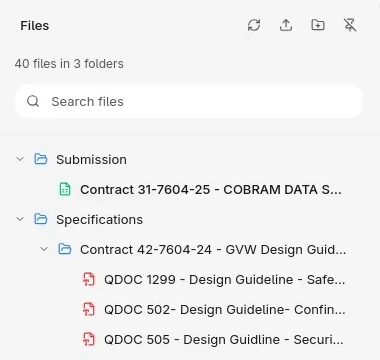
Every artefact, against the pursuit it belongs to.

  • RFP pack · 14 sections · indexed
  • Addendum #3 · changes flagged
  • Evidence · 8 attachments matched
WORKSPACE · DOCUMENTS
AI CHAT02 / 04

An assistant that reads the brief alongside your team.

  • Asked: summarise mandatory criteria
  • Drafted: a comparable-experience answer
  • Cited: 4 sources from the workspace
WORKSPACE · AI CHAT
DRAFT03 / 04

Response drafted in canonical form, ready to polish.

  • Section 2.1 · Capability · drafted
  • Section 3.4 · Methodology · in review
  • Section 4.0 · Pricing · awaiting evidence
WORKSPACE · DRAFT
AWARDS04 / 04

Incumbent and pricing memory on the same surface.

  • Incumbent · 3 contracts with buyer
  • Comparable · 12 awards · $1.4–2.8M
  • Win-rate · category · 38%
WORKSPACE · AWARDS

How it works

  1. STEP 01

    Promote

    One action promotes a listing into a workspace. The RFP pack, addenda and metadata land pre-loaded.

  2. STEP 02

    Operate

    Documents, drafts, AI support and decisions in one frame. The team runs the pursuit end-to-end without leaving the room.

  3. STEP 03

    Submit

    A draft pack in canonical form — sections answered, evidence attached, citations grounded. Reviewers polish the last mile.

What it changes

“We stopped running pursuits out of inboxes. Every tender has its own room — the team walks in and the brief, the evidence and the draft are already there.”

BID DIRECTOR · FACILITIES · PRIVATE PREVIEW
3–5×
PURSUITS · IN FLIGHT · PER ESTIMATOR

Concurrency without the tab graveyard.

Days → hours
TIME · TO A DECISION

Go/no-go reads off one frame, not five inboxes.

2× faster
DRAFT · TURNAROUND

From workspace open to reviewable draft pack.

Composite figures from private-preview cohort patterns. Anonymised at the customers' request — talk to sales for references.

FAQ

Tender workspace questions.

What is tender workspace software?

Tender workspace software gives each pursuit one operating room for documents, criteria, evidence, drafts, comments and decisions. Tendor keeps the bid team working from the same tender record instead of scattered inboxes and folders.

How does Tendor help teams run multiple tenders at once?

Each opportunity becomes its own workspace with the RFP pack, addenda, evidence library, response draft and awards context preloaded. Bid managers and estimators can switch pursuits without losing the status, owner or next action.

Can a workspace support bid/no-bid decisions?

Yes. Tendor workspaces connect tender requirements, feasibility notes, pricing and awards intelligence so teams can decide whether to bid before they spend a week drafting.

ONE ROOM PER PURSUIT

Stop running tenders out of inboxes. Open the room instead.

A 30-minute demo against a live pursuit from your pipeline. Documents, AI Chat, Draft and Awards in one frame.